(Cross-posted on the Online Security Blog)
Earlier this year, we introduced a security feature called 2-step verification that helps protect your Google Account from threats like password compromise and identity theft. By entering a one-time verification code from your phone after you type your password, you can make it much tougher for an unauthorized person to gain access to your account.
People have told us how much they like the feature, which is why we're thrilled to offer 2-step verification in 40 languages and in more than 150 countries. There’s never been a better time to set it up: Examples in the news of password theft and data breaches constantly remind us to stay on our toes and take advantage of tools to properly secure our valuable online information. Email, social networking and other online accounts still get compromised today, but 2-step verification cuts those risks significantly.
We recommend investing some time in keeping your information safe by watching our 2-step verification video to learn how to quickly increase your Google Account’s resistance to common problems like reused passwords and malware and phishing scams. Wherever you are in the world, sign up for 2-step verification and help keep yourself one step ahead of the bad guys.
To learn more about online safety tips and resources, visit our ongoing security blog series, and review a couple of simple tips and tricks for online security. Also, watch our video about five easy ways to help you stay safe and secure as you browse.
Showing posts with label security. Show all posts
Showing posts with label security. Show all posts
Thursday, July 28, 2011
Tuesday, July 19, 2011
Using data to protect people from malware
(Cross-posted on the Google Online Security Blog)
The Internet brings remarkable benefits to society. Unfortunately, some people use it for harm and their own gain at the expense of others. We believe in the power of the web and information, and we work every day to detect potential abuse of our services and ward off attacks.
As we work to protect our users and their information, we sometimes discover unusual patterns of activity. Recently, we found some unusual search traffic while performing routine maintenance on one of our data centers. After collaborating with security engineers at several companies that were sending this modified traffic, we determined that the computers exhibiting this behavior were infected with a particular strain of malicious software, or “malware.” As a result of this discovery, today some people will see a prominent notification at the top of their Google web search results:

This particular malware causes infected computers to send traffic to Google through a small number of intermediary servers called “proxies.” We hope that by taking steps to notify users whose traffic is coming through these proxies, we can help them update their antivirus software and remove the infections.
We hope to use the knowledge we’ve gathered to assist as many people as possible. In case our notice doesn’t reach everyone directly, you can run a system scan on your computer yourself by following the steps in our Help Center article.
Update July 20, 2011: We've seen a few common questions we thought we'd address here:
The Internet brings remarkable benefits to society. Unfortunately, some people use it for harm and their own gain at the expense of others. We believe in the power of the web and information, and we work every day to detect potential abuse of our services and ward off attacks.
As we work to protect our users and their information, we sometimes discover unusual patterns of activity. Recently, we found some unusual search traffic while performing routine maintenance on one of our data centers. After collaborating with security engineers at several companies that were sending this modified traffic, we determined that the computers exhibiting this behavior were infected with a particular strain of malicious software, or “malware.” As a result of this discovery, today some people will see a prominent notification at the top of their Google web search results:

This particular malware causes infected computers to send traffic to Google through a small number of intermediary servers called “proxies.” We hope that by taking steps to notify users whose traffic is coming through these proxies, we can help them update their antivirus software and remove the infections.
We hope to use the knowledge we’ve gathered to assist as many people as possible. In case our notice doesn’t reach everyone directly, you can run a system scan on your computer yourself by following the steps in our Help Center article.
Update July 20, 2011: We've seen a few common questions we thought we'd address here:
- The malware appears to have gotten onto users' computers from one of roughly a hundred variants of fake antivirus, or "fake AV" software that has been in circulation for a while. We aren't aware of a common name for the malware.
- We believe a couple million machines are affected by this malware.
- We've heard from a number of you that you're thinking about the potential for an attacker to copy our notice and attempt to point users to a dangerous site instead. It's a good security practice to be cautious about the links you click, so the spirit of those comments is spot-on. We thought about this, too, which is why the notice appears only at the top of our search results page. Falsifying the message on this page would require prior compromise of that computer, so the notice is not a risk to additional users.
- In the meantime, we've been able to successfully warn hundreds of thousands of users that their computer is infected. These are people who otherwise may never have known.
Wednesday, June 1, 2011
Ensuring your information is safe online
The Internet has been an amazing force for good in the world—opening up communications, boosting economic growth and promoting free expression. But like all technologies, it can also be used for bad things. Today, despite the efforts of Internet companies and the security community, identity theft, fraud and the hijacking of people’s email accounts are common problems online.
Bad actors take advantage of the fact that most people aren’t that tech savvy—hijacking accounts by using malware and phishing scams that trick users into sharing their passwords, or by using passwords obtained by hacking other websites. Most account hijackings are not very targeted; they are designed to steal identities, acquire financial data or send spam. But some attacks are targeted at specific individuals.
Through the strength of our cloud-based security and abuse detection systems*, we recently uncovered a campaign to collect user passwords, likely through phishing. This campaign, which appears to originate from Jinan, China, affected what seem to be the personal Gmail accounts of hundreds of users including, among others, senior U.S. government officials, Chinese political activists, officials in several Asian countries (predominantly South Korea), military personnel and journalists.
The goal of this effort seems to have been to monitor the contents of these users’ emails, with the perpetrators apparently using stolen passwords to change peoples’ forwarding and delegation settings. (Gmail enables you to forward your emails automatically, as well as grant others access to your account.)
Google detected and has disrupted this campaign to take users’ passwords and monitor their emails. We have notified victims and secured their accounts. In addition, we have notified relevant government authorities.
It’s important to stress that our internal systems have not been affected—these account hijackings were not the result of a security problem with Gmail itself. But we believe that being open about these security issues helps users better protect their information online.
Here are some ways to improve your security when using Google products:


*We also relied on user reports and this external report to uncover the campaign described.
Bad actors take advantage of the fact that most people aren’t that tech savvy—hijacking accounts by using malware and phishing scams that trick users into sharing their passwords, or by using passwords obtained by hacking other websites. Most account hijackings are not very targeted; they are designed to steal identities, acquire financial data or send spam. But some attacks are targeted at specific individuals.
Through the strength of our cloud-based security and abuse detection systems*, we recently uncovered a campaign to collect user passwords, likely through phishing. This campaign, which appears to originate from Jinan, China, affected what seem to be the personal Gmail accounts of hundreds of users including, among others, senior U.S. government officials, Chinese political activists, officials in several Asian countries (predominantly South Korea), military personnel and journalists.
The goal of this effort seems to have been to monitor the contents of these users’ emails, with the perpetrators apparently using stolen passwords to change peoples’ forwarding and delegation settings. (Gmail enables you to forward your emails automatically, as well as grant others access to your account.)
Google detected and has disrupted this campaign to take users’ passwords and monitor their emails. We have notified victims and secured their accounts. In addition, we have notified relevant government authorities.
It’s important to stress that our internal systems have not been affected—these account hijackings were not the result of a security problem with Gmail itself. But we believe that being open about these security issues helps users better protect their information online.
Here are some ways to improve your security when using Google products:
- Enable 2-step verification. This Gmail feature uses a phone and second password on sign-in, and it protected some accounts from this attack. So check out this video on setting up 2-step verification.

- Use a strong password for Google that you do not use on any other site. Here’s a video to help.
- Enter your password only into a proper sign-in prompt on a https://www.google.com domain. We will never ask you to email your password or enter it into a form that appears within an email message. Here’s a video with more advice.
- Check your Gmail settings for suspicious forwarding addresses (“Forwarding and POP/IMAP” tab, Fig. 1) or delegated accounts (“Accounts” tab, Fig. 2).

Fig. 1

Fig. 2
- Watch for the red warnings about suspicious account activity that may appear on top of your Gmail inbox.
- Review the security features offered by the Chrome browser. If you don’t already use Chrome, consider switching your browser to Chrome.
- Explore other security recommendations and a video with tips on how to stay safe across the web.
*We also relied on user reports and this external report to uncover the campaign described.
Thursday, February 10, 2011
Advanced sign-in security for your Google account
(Cross-posted on the Gmail Blog)
Most of us are used to entrusting our information to a password, but we know that some of you are looking for something stronger. As we announced to our Google Apps customers a few months ago, we've developed an advanced opt-in security feature called 2-step verification that makes your Google Account significantly more secure by helping to verify that you're the real owner of your account. Now it's time to offer the same advanced protection to all of our users.
2-step verification requires two independent factors for authentication, much like you might see on your banking website: your password, plus a code obtained using your phone. Over the next few days, you'll see a new link on your Account Settings page that looks like this:

Take your time to carefully set up 2-step verification—we expect it may take up to 15 minutes to enroll. A user-friendly set-up wizard will guide you through the process, including setting up a backup phone and creating backup codes in case you lose access to your primary phone. Once you enable 2-step verification, you'll see an extra page that prompts you for a code when you sign in to your account. After entering your password, Google will call you with the code, send you an SMS message or give you the choice to generate the code for yourself using a mobile application on your Android, BlackBerry or iPhone device. The choice is up to you. When you enter this code after correctly submitting your password we'll have a pretty good idea that the person signing in is actually you.

It's an extra step, but it's one that significantly improves the security of your Google Account because it requires the powerful combination of both something you know—your username and password—and something that only you should have—your phone. A hacker would need access to both of these factors to gain access to your account. If you like, you can always choose a "Remember verification for this computer for 30 days" option, and you won't need to re-enter a code for another 30 days. You can also set up one-time application-specific passwords to sign in to your account from non-browser based applications that are designed to only ask for a password, and cannot prompt for the code.
To learn more about 2-step verification and get started, visit our Help Center. And for more about staying safe online, see our ongoing security blog series or visit http://www.staysafeonline.org/. Be safe!
Monday, October 4, 2010
National Cyber Security Awareness Month 2010: Stop. Think. Connect.
Governments, industry and everyday people have been abuzz this year about online security to a larger extent than ever before. People are talking about their information, how they share it with others and how they secure it. With more information moving online, and with cyber attacks on the rise, we think it’s important that we keep the conversation about security flowing.
Google has renewed its commitment to security this year and has pushed industry boundaries to help people better protect their information in new ways. Here are just a few examples: We became the first major email provider to offer default HTTPS encryption for the entire email session, and we introduced an encrypted search option for Google.com. We designed a new system to make Google Accounts more secure, and added suspicious activity detection for our users. Google Apps became the first suite of cloud computing applications to receive Federal Information Security Management Act (FISMA) certification from the U.S. government. We also published new security products, tools and research to help web developers and network administrators make the rest of the web more secure.

I sit on the board of the National Cyber Security Alliance (NCSA) to promote work that encourages safer online habits. Together with that organization, the U.S. Department of Homeland Security (DHS) and a host of other companies, Google is taking the month of October to recognize National Cyber Security Awareness Month. As we did in a blog post series last year, we’ll explore simple ways that people can make use of Google’s technologies and tools, as well other freely available resources and advice, to better protect themselves and their information.
We will post links here throughout the month, so be sure to check back often:
Google has renewed its commitment to security this year and has pushed industry boundaries to help people better protect their information in new ways. Here are just a few examples: We became the first major email provider to offer default HTTPS encryption for the entire email session, and we introduced an encrypted search option for Google.com. We designed a new system to make Google Accounts more secure, and added suspicious activity detection for our users. Google Apps became the first suite of cloud computing applications to receive Federal Information Security Management Act (FISMA) certification from the U.S. government. We also published new security products, tools and research to help web developers and network administrators make the rest of the web more secure.

I sit on the board of the National Cyber Security Alliance (NCSA) to promote work that encourages safer online habits. Together with that organization, the U.S. Department of Homeland Security (DHS) and a host of other companies, Google is taking the month of October to recognize National Cyber Security Awareness Month. As we did in a blog post series last year, we’ll explore simple ways that people can make use of Google’s technologies and tools, as well other freely available resources and advice, to better protect themselves and their information.
We will post links here throughout the month, so be sure to check back often:
Tips and Tricks: Sharing Google Docs Like a Pro
Protect your data in the cloud
This Internet is Your Internet: Digital Citizenship from California to Washtenaw County
Protect your data in the cloud
This Internet is Your Internet: Digital Citizenship from California to Washtenaw County
Understanding the omnibox for better security (Google Chrome Blog)
Remember these tips for safer shopping
Remember, even with so many people and groups focused on creating a safer web experience for everyone, we all have a responsibility to take steps to protect ourselves online. The NCSA recommends that we keep our wits about us and think carefully about our online actions before we take them. In that spirit, we encourage you to: Stop. Think. Connect.

Remember, even with so many people and groups focused on creating a safer web experience for everyone, we all have a responsibility to take steps to protect ourselves online. The NCSA recommends that we keep our wits about us and think carefully about our online actions before we take them. In that spirit, we encourage you to: Stop. Think. Connect.

Monday, September 20, 2010
Three million businesses have gone Google: celebrating growth, innovation and security
Today we’re hosting more than 300 CIOs and IT professionals from around the world in Paris at Google Atmosphere, our annual European event dedicated to cloud computing—web-based applications that are built on shared infrastructure and delivered through the browser. This year, the discussion at Atmosphere is focused on how companies can benefit from the breakthroughs in productivity and security that cloud-based applications are uniquely capable of delivering.
This event also marks some major milestones:

Second, today we demonstrated new mobile editing capabilities for Google Docs on the Android platform and the iPad. In the next few weeks, co-workers around the world will soon be able to co-edit files simultaneously from an even wider array of devices.
Only cloud computing is able to deliver the whole package of productivity-enhancing collaboration, superior reliability and virtually unlimited scale at a price that’s affordable for any size organization. Our Atmosphere event is a nice opportunity to step back and fully appreciate the power of the cloud with customers and future customers alike.
This event also marks some major milestones:
- As of today, more than 3 million businesses have gone Google, and over 30 million users within businesses, schools and organizations now depend on our messaging and collaboration tools.
- We’re launching new cloud-powered capabilities: two-step verification to help enhance security and soon, mobile editing in Google Docs on Android and the iPad™.

Second, today we demonstrated new mobile editing capabilities for Google Docs on the Android platform and the iPad. In the next few weeks, co-workers around the world will soon be able to co-edit files simultaneously from an even wider array of devices.
Only cloud computing is able to deliver the whole package of productivity-enhancing collaboration, superior reliability and virtually unlimited scale at a price that’s affordable for any size organization. Our Atmosphere event is a nice opportunity to step back and fully appreciate the power of the cloud with customers and future customers alike.
Tuesday, September 7, 2010
Simpler sign-ups for Yahoo! users with OpenID
How many times have you created a new account at a website and seen a message that said: “Thank you for creating an account. To activate your new account, please access your email and click the verification URL provided.”
Even though you just want to start using the website, this lengthy process requires you to manually perform a whole bunch of steps—including switching to your mailbox, trying to find the message the website sent you (which might be in your Spam folder), opening the message, clicking the link, etc. Until recently, we also required people to follow these steps if they wanted to sign up for a Google Account using their existing email address, such as a @yahoo.com, @hotmail.com, or other address.
To make this process simpler, we’re now using an Internet standard called OpenID which is supported by several email providers, including Yahoo!. Instead of the process above, Yahoo! users who sign up with Google see the page below with a button that sends them to Yahoo! for verification.
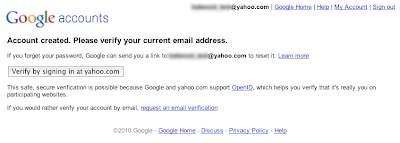
Once you click that button, Yahoo! shows you a page to get your consent to share your email address with Google.
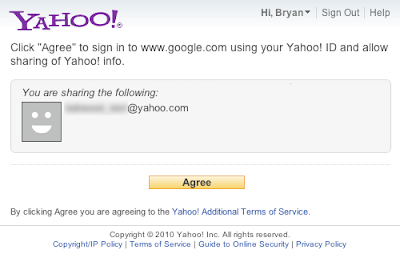
After you agree, you’re done and can start using any Google service, such as Google Groups, Docs, Reader, AdWords, etc. We have found that a much larger number of people complete the email verification process when this method is used.
In the future we hope to expand this feature to other email providers, and we also hope other website operators will read more on the Google Code Blog about how they can implement a similar feature.
Even though you just want to start using the website, this lengthy process requires you to manually perform a whole bunch of steps—including switching to your mailbox, trying to find the message the website sent you (which might be in your Spam folder), opening the message, clicking the link, etc. Until recently, we also required people to follow these steps if they wanted to sign up for a Google Account using their existing email address, such as a @yahoo.com, @hotmail.com, or other address.
To make this process simpler, we’re now using an Internet standard called OpenID which is supported by several email providers, including Yahoo!. Instead of the process above, Yahoo! users who sign up with Google see the page below with a button that sends them to Yahoo! for verification.

Once you click that button, Yahoo! shows you a page to get your consent to share your email address with Google.

After you agree, you’re done and can start using any Google service, such as Google Groups, Docs, Reader, AdWords, etc. We have found that a much larger number of people complete the email verification process when this method is used.
In the future we hope to expand this feature to other email providers, and we also hope other website operators will read more on the Google Code Blog about how they can implement a similar feature.
Friday, May 21, 2010
Search more securely with encrypted Google web search
Update June 25, 2010: Since we introduced our encrypted search option last month, we’ve been listening closely to user feedback. Many users appreciate the capability to perform searches with better protection against snooping from third parties. We’ve also heard about some challenges faced by various school districts, and today, we want to inform you that we’ve moved encrypted search from https://www.google.com to https://encrypted.google.com. The site functions in the same way. For more information on this change, please read on here.
As people spend more time on the Internet, they want greater control over who has access to their online communications. Many Internet services use what are known as Secure Sockets Layer (SSL) connections to encrypt information that travels between your computer and their service. Usually recognized by a web address starting with “https” or a browser lock icon, this technology is regularly used by online banking sites and e-commerce websites. Other sites may also implement SSL in a more limited fashion, for example, to help protect your passwords when you enter your login information.
Years ago Google added SSL encryption to products ranging from Gmail to Google Docs and others, and we continue to enable encryption on more services. Like banking and e-commerce sites, Google’s encryption extends beyond login passwords to the entire service. This session-wide encryption is a significant privacy advantage over systems that only encrypt login pages and credit card information. Early this year, we took an important step forward by making SSL the default setting for all Gmail users. And today we’re gradually rolling out a new choice to search more securely at https://www.google.com.
When you search on https://www.google.com, an encrypted connection is created between your browser and Google. This secured channel helps protect your search terms and your search results pages from being intercepted by a third party on your network. The service includes a modified logo to help indicate that you’re searching using SSL and that you may encounter a somewhat different Google search experience, but as always, remember to check the start of the address bar for “https” and your browser lock indicators:
 Today’s release comes with a “beta” label for a few reasons. First, it currently covers only the core Google web search product. To help avoid misunderstanding, when you search using SSL, you won’t see links to offerings like Image Search and Maps that, for the most part, don’t support SSL at this time. Also, since SSL connections require additional time to set up the encryption between your browser and the remote web server, your experience with search over SSL might be slightly slower than your regular Google search experience. What won’t change is that you will still get the same great search results.
A few notes to remember: Google will still maintain search data to improve your search quality and to provide better service. Searching over SSL doesn’t reduce the data sent to Google — it only hides that data from third parties who seek it. And clicking on any of the web results, including Google universal search results for unsupported services like Google Images, could take you out of SSL mode. Our hope is that more websites and services will add support for SSL to help create a better and more consistent experience for you.
We think users will appreciate this new option for searching. It’s a helpful addition to users’ online privacy and security, and we’ll continue to add encryption support for more search offerings. To learn more about using the feature, refer to our help article on search over SSL.
As people spend more time on the Internet, they want greater control over who has access to their online communications. Many Internet services use what are known as Secure Sockets Layer (SSL) connections to encrypt information that travels between your computer and their service. Usually recognized by a web address starting with “https” or a browser lock icon, this technology is regularly used by online banking sites and e-commerce websites. Other sites may also implement SSL in a more limited fashion, for example, to help protect your passwords when you enter your login information.
Years ago Google added SSL encryption to products ranging from Gmail to Google Docs and others, and we continue to enable encryption on more services. Like banking and e-commerce sites, Google’s encryption extends beyond login passwords to the entire service. This session-wide encryption is a significant privacy advantage over systems that only encrypt login pages and credit card information. Early this year, we took an important step forward by making SSL the default setting for all Gmail users. And today we’re gradually rolling out a new choice to search more securely at https://www.google.com.
When you search on https://www.google.com, an encrypted connection is created between your browser and Google. This secured channel helps protect your search terms and your search results pages from being intercepted by a third party on your network. The service includes a modified logo to help indicate that you’re searching using SSL and that you may encounter a somewhat different Google search experience, but as always, remember to check the start of the address bar for “https” and your browser lock indicators:
 Today’s release comes with a “beta” label for a few reasons. First, it currently covers only the core Google web search product. To help avoid misunderstanding, when you search using SSL, you won’t see links to offerings like Image Search and Maps that, for the most part, don’t support SSL at this time. Also, since SSL connections require additional time to set up the encryption between your browser and the remote web server, your experience with search over SSL might be slightly slower than your regular Google search experience. What won’t change is that you will still get the same great search results.
A few notes to remember: Google will still maintain search data to improve your search quality and to provide better service. Searching over SSL doesn’t reduce the data sent to Google — it only hides that data from third parties who seek it. And clicking on any of the web results, including Google universal search results for unsupported services like Google Images, could take you out of SSL mode. Our hope is that more websites and services will add support for SSL to help create a better and more consistent experience for you.
We think users will appreciate this new option for searching. It’s a helpful addition to users’ online privacy and security, and we’ll continue to add encryption support for more search offerings. To learn more about using the feature, refer to our help article on search over SSL.
Friday, May 14, 2010
WiFi data collection: An update
Update June 9, 2010:
When we announced three weeks ago that we had mistakenly included code in our software that collected samples of payload data from WiFi networks, we said we would ask a third party to review the software at issue, how it worked, and what data it gathered. That report, by the security consulting firm Stroz Friedberg, is now complete and was sent to the interested data protection authorities today. In short, it confirms that Google did indeed collect and store payload data from unencrypted WiFi networks, but not from networks that were encrypted. You can read the report here. We are continuing to work with the relevant authorities to respond to their questions and concerns.
Update May 17, 2010:
When we announced three weeks ago that we had mistakenly included code in our software that collected samples of payload data from WiFi networks, we said we would ask a third party to review the software at issue, how it worked, and what data it gathered. That report, by the security consulting firm Stroz Friedberg, is now complete and was sent to the interested data protection authorities today. In short, it confirms that Google did indeed collect and store payload data from unencrypted WiFi networks, but not from networks that were encrypted. You can read the report here. We are continuing to work with the relevant authorities to respond to their questions and concerns.
Update May 17, 2010:
On Friday May 14 the Irish Data Protection Authority asked us to delete the payload data we collected in error in Ireland. We can confirm that all data identified as being from Ireland was deleted over the weekend in the presence of an independent third party. We are reaching out to Data Protection Authorities in the other relevant countries about how to dispose of the remaining data as quickly as possible.
You can read the letter from the independent third party, confirming deletion, here.
[original post]
Nine days ago the data protection authority (DPA) in Hamburg, Germany asked to audit the WiFi data that our Street View cars collect for use in location-based products like Google Maps for mobile, which enables people to find local restaurants or get directions. His request prompted us to re-examine everything we have been collecting, and during our review we discovered that a statement made in a blog post on April 27 was incorrect.
In that blog post, and in a technical note sent to data protection authorities the same day, we said that while Google did collect publicly broadcast SSID information (the WiFi network name) and MAC addresses (the unique number given to a device like a WiFi router) using Street View cars, we did not collect payload data (information sent over the network). But it’s now clear that we have been mistakenly collecting samples of payload data from open (i.e. non-password-protected) WiFi networks, even though we never used that data in any Google products.
However, we will typically have collected only fragments of payload data because: our cars are on the move; someone would need to be using the network as a car passed by; and our in-car WiFi equipment automatically changes channels roughly five times a second. In addition, we did not collect information traveling over secure, password-protected WiFi networks.
So how did this happen? Quite simply, it was a mistake. In 2006 an engineer working on an experimental WiFi project wrote a piece of code that sampled all categories of publicly broadcast WiFi data. A year later, when our mobile team started a project to collect basic WiFi network data like SSID information and MAC addresses using Google’s Street View cars, they included that code in their software—although the project leaders did not want, and had no intention of using, payload data.
As soon as we became aware of this problem, we grounded our Street View cars and segregated the data on our network, which we then disconnected to make it inaccessible. We want to delete this data as soon as possible, and are currently reaching out to regulators in the relevant countries about how to quickly dispose of it.
Maintaining people’s trust is crucial to everything we do, and in this case we fell short. So we will be:
- Asking a third party to review the software at issue, how it worked and what data it gathered, as well as to confirm that we deleted the data appropriately; and
- Internally reviewing our procedures to ensure that our controls are sufficiently robust to address these kinds of problems in the future.
This incident highlights just how publicly accessible open, non-password-protected WiFi networks are today. Earlier this year, we encrypted Gmail for all our users, and next week we will start offering an encrypted version of Google Search. For other services users can check that pages are encrypted by looking to see whether the URL begins with “https”, rather than just “http”; browsers will generally show a lock icon when the connection is secure. For more information about how to password-protect your network, read this.
The engineering team at Google works hard to earn your trust—and we are acutely aware that we failed badly here. We are profoundly sorry for this error and are determined to learn all the lessons we can from our mistake.
Tuesday, January 12, 2010
A new approach to China
Like many other well-known organizations, we face cyber attacks of varying degrees on a regular basis. In mid-December, we detected a highly sophisticated and targeted attack on our corporate infrastructure originating from China that resulted in the theft of intellectual property from Google. However, it soon became clear that what at first appeared to be solely a security incident--albeit a significant one--was something quite different.
First, this attack was not just on Google. As part of our investigation we have discovered that at least twenty other large companies from a wide range of businesses--including the Internet, finance, technology, media and chemical sectors--have been similarly targeted. We are currently in the process of notifying those companies, and we are also working with the relevant U.S. authorities.
Second, we have evidence to suggest that a primary goal of the attackers was accessing the Gmail accounts of Chinese human rights activists. Based on our investigation to date we believe their attack did not achieve that objective. Only two Gmail accounts appear to have been accessed, and that activity was limited to account information (such as the date the account was created) and subject line, rather than the content of emails themselves.
Third, as part of this investigation but independent of the attack on Google, we have discovered that the accounts of dozens of U.S.-, China- and Europe-based Gmail users who are advocates of human rights in China appear to have been routinely accessed by third parties. These accounts have not been accessed through any security breach at Google, but most likely via phishing scams or malware placed on the users' computers.
We have already used information gained from this attack to make infrastructure and architectural improvements that enhance security for Google and for our users. In terms of individual users, we would advise people to deploy reputable anti-virus and anti-spyware programs on their computers, to install patches for their operating systems and to update their web browsers. Always be cautious when clicking on links appearing in instant messages and emails, or when asked to share personal information like passwords online. You can read more here about our cyber-security recommendations. People wanting to learn more about these kinds of attacks can read this Report to Congress (PDF) by the U.S.-China Economic and Security Review Commission (see p. 163-), as well as a related analysis (PDF) prepared for the Commission, Nart Villeneuve's blog and this presentation on the GhostNet spying incident.
We have taken the unusual step of sharing information about these attacks with a broad audience not just because of the security and human rights implications of what we have unearthed, but also because this information goes to the heart of a much bigger global debate about freedom of speech. In the last two decades, China's economic reform programs and its citizens' entrepreneurial flair have lifted hundreds of millions of Chinese people out of poverty. Indeed, this great nation is at the heart of much economic progress and development in the world today.
We launched Google.cn in January 2006 in the belief that the benefits of increased access to information for people in China and a more open Internet outweighed our discomfort in agreeing to censor some results. At the time we made clear that "we will carefully monitor conditions in China, including new laws and other restrictions on our services. If we determine that we are unable to achieve the objectives outlined we will not hesitate to reconsider our approach to China."
These attacks and the surveillance they have uncovered--combined with the attempts over the past year to further limit free speech on the web--have led us to conclude that we should review the feasibility of our business operations in China. We have decided we are no longer willing to continue censoring our results on Google.cn, and so over the next few weeks we will be discussing with the Chinese government the basis on which we could operate an unfiltered search engine within the law, if at all. We recognize that this may well mean having to shut down Google.cn, and potentially our offices in China.
The decision to review our business operations in China has been incredibly hard, and we know that it will have potentially far-reaching consequences. We want to make clear that this move was driven by our executives in the United States, without the knowledge or involvement of our employees in China who have worked incredibly hard to make Google.cn the success it is today. We are committed to working responsibly to resolve the very difficult issues raised.
Update: Added a link to another referenced report in paragraph 5.
First, this attack was not just on Google. As part of our investigation we have discovered that at least twenty other large companies from a wide range of businesses--including the Internet, finance, technology, media and chemical sectors--have been similarly targeted. We are currently in the process of notifying those companies, and we are also working with the relevant U.S. authorities.
Second, we have evidence to suggest that a primary goal of the attackers was accessing the Gmail accounts of Chinese human rights activists. Based on our investigation to date we believe their attack did not achieve that objective. Only two Gmail accounts appear to have been accessed, and that activity was limited to account information (such as the date the account was created) and subject line, rather than the content of emails themselves.
Third, as part of this investigation but independent of the attack on Google, we have discovered that the accounts of dozens of U.S.-, China- and Europe-based Gmail users who are advocates of human rights in China appear to have been routinely accessed by third parties. These accounts have not been accessed through any security breach at Google, but most likely via phishing scams or malware placed on the users' computers.
We have already used information gained from this attack to make infrastructure and architectural improvements that enhance security for Google and for our users. In terms of individual users, we would advise people to deploy reputable anti-virus and anti-spyware programs on their computers, to install patches for their operating systems and to update their web browsers. Always be cautious when clicking on links appearing in instant messages and emails, or when asked to share personal information like passwords online. You can read more here about our cyber-security recommendations. People wanting to learn more about these kinds of attacks can read this Report to Congress (PDF) by the U.S.-China Economic and Security Review Commission (see p. 163-), as well as a related analysis (PDF) prepared for the Commission, Nart Villeneuve's blog and this presentation on the GhostNet spying incident.
We have taken the unusual step of sharing information about these attacks with a broad audience not just because of the security and human rights implications of what we have unearthed, but also because this information goes to the heart of a much bigger global debate about freedom of speech. In the last two decades, China's economic reform programs and its citizens' entrepreneurial flair have lifted hundreds of millions of Chinese people out of poverty. Indeed, this great nation is at the heart of much economic progress and development in the world today.
We launched Google.cn in January 2006 in the belief that the benefits of increased access to information for people in China and a more open Internet outweighed our discomfort in agreeing to censor some results. At the time we made clear that "we will carefully monitor conditions in China, including new laws and other restrictions on our services. If we determine that we are unable to achieve the objectives outlined we will not hesitate to reconsider our approach to China."
These attacks and the surveillance they have uncovered--combined with the attempts over the past year to further limit free speech on the web--have led us to conclude that we should review the feasibility of our business operations in China. We have decided we are no longer willing to continue censoring our results on Google.cn, and so over the next few weeks we will be discussing with the Chinese government the basis on which we could operate an unfiltered search engine within the law, if at all. We recognize that this may well mean having to shut down Google.cn, and potentially our offices in China.
The decision to review our business operations in China has been incredibly hard, and we know that it will have potentially far-reaching consequences. We want to make clear that this move was driven by our executives in the United States, without the knowledge or involvement of our employees in China who have worked incredibly hard to make Google.cn the success it is today. We are committed to working responsibly to resolve the very difficult issues raised.
Update: Added a link to another referenced report in paragraph 5.
Tuesday, November 3, 2009
Cutting back on your long list of passwords
Does anyone actually like passwords? Most people can't stand them because they end up having to keep track of a long (and often memorized) list of usernames and passwords to sign into the websites they visit. Website owners hate them because it's hard to get people to create a new account on their website, and almost half of those account registrations are never completed. Thanks to the utilization of new technology, we're now seeing large-scale success in eliminating the need for passwords while increasing the successful registration rate at websites to over 90%. The most visible examples come from Plaxo, Facebook, Yahoo! and Google using a technique the industry calls hybrid onboarding. In the past, if you're a Gmail user who got an invitation to use Plaxo or Facebook, you were asked to perform the traditional process of creating a new account with yet another password, and then you might also have been asked to provide the password of your email account so Plaxo or Facebook could look up the list of your friends. With hybrid onboarding, if you click on such an invitation in your Gmail, you'll see a page like one of these:

Clicking the large button on the Plaxo page takes you to a page at Google like this:

If you give consent to share a few pieces of information, you are sent back to Plaxo with all key registration steps finished.


Clicking the large button on the Plaxo page takes you to a page at Google like this:

If you give consent to share a few pieces of information, you are sent back to Plaxo with all key registration steps finished.

The registration process used to involve more than 10 steps, including requiring you to find one of those "email validation" messages in your inbox. If you've followed the steps above, you can now sign into Plaxo more easily — by simply clicking a button.
While Plaxo showed the first successful results of this technique in early 2009, other companies like Facebook are starting to use the same model and to recognize its business value potential. At the same time, the hybrid onboarding model improves authentication security because websites like Plaxo that use this technique never see a password from you at all. Since you don't have to enter your password on additional sites, your password remains closer to you and is less likely to be misused. We'd like to applaud Plaxo and Facebook's work in designing the user experience needed for this technique as well as pushing us to create the optimizations needed to carry out their design. Today we're happy to announce that all of these login flow designs are now available to any website operator. All of these hybrid onboarding techniques are based on industry standards that both Google and Yahoo! support, and that other email providers are beginning to support as well. For more technical details, check out our Google Code Blog post.
Hybrid onboarding is also being used by Enterprise Software-as-a-Service vendors — such as ZoHo — that want to eliminate the need for employees at their customers' businesses to create another password. More details are available on our Enterprise Blog. In addition, after a thorough evaluation of the security and privacy of these technologies, the same techniques are being piloted by President Obama's open identity initiative to enable citizens to sign in more easily to government-operated websites.
There is still a long way to go before you'll be able to trim down your long list of website passwords, but this progress demonstrates the potential for even the largest websites to adopt to adopt the hybrid onboarding model. We hope many other websites will follow.
While Plaxo showed the first successful results of this technique in early 2009, other companies like Facebook are starting to use the same model and to recognize its business value potential. At the same time, the hybrid onboarding model improves authentication security because websites like Plaxo that use this technique never see a password from you at all. Since you don't have to enter your password on additional sites, your password remains closer to you and is less likely to be misused. We'd like to applaud Plaxo and Facebook's work in designing the user experience needed for this technique as well as pushing us to create the optimizations needed to carry out their design. Today we're happy to announce that all of these login flow designs are now available to any website operator. All of these hybrid onboarding techniques are based on industry standards that both Google and Yahoo! support, and that other email providers are beginning to support as well. For more technical details, check out our Google Code Blog post.
Hybrid onboarding is also being used by Enterprise Software-as-a-Service vendors — such as ZoHo — that want to eliminate the need for employees at their customers' businesses to create another password. More details are available on our Enterprise Blog. In addition, after a thorough evaluation of the security and privacy of these technologies, the same techniques are being piloted by President Obama's open identity initiative to enable citizens to sign in more easily to government-operated websites.
There is still a long way to go before you'll be able to trim down your long list of website passwords, but this progress demonstrates the potential for even the largest websites to adopt to adopt the hybrid onboarding model. We hope many other websites will follow.
Monday, November 2, 2009
Next steps in cyber security awareness
(Cross-posted from the Public Policy blog)
Last week I joined several industry experts to speak at a cyber security panel on Capitol Hill organized by Congresswoman Yvette Clarke and sponsored by the Committee on Homeland Security. The conversation focused on things everyday Internet users can do to help protect their computers and stay safe online. Given that we just wrapped up our observation of National Cyber Security Awareness Month, I thought I'd share some of the key recommendations from the panel:
What are the most important things we all need to do to protect our computers and mobile devices?
You should have the same expectations when using the Internet as you would when exploring a city: you don't give your credit card to the person selling watches on the street just because you recognize the brand, you don't let your kids wander around by themselves and you don't give personal information unless you know who's getting it. If an offer is "urgent" or seems too good to be true, take a step back and research the offer. Add a password to your mobile phone, and browse cautiously on open WiFi networks as you would when using a computer.
What are the most common misconceptions about cyber security?
Many dangerous websites are not designed to be dangerous. In fact, most of the sites that serve malware (malicious software) are innocent sites that have been compromised in one way or another. Your computer isn't necessarily safe just because you're avoiding sites that contain adult content or pirated software. Use reputable anti-virus and anti-spyware programs, and keep your computer operating system and applications updated with the latest software versions.
How do I know if my computer or network has been compromised?
First, disconnect it from the Internet. Take note of any slowness, and if you're not sure how to proceed, get someone with technical expertise to check your network logs for high traffic appearing during times when you're not using the computer. When in doubt, contact a computer support expert.
As President Obama recently stated, cyber security is a shared responsibility. At Google, we recognize how important awareness and education are because many online security threats can only be avoided if we work together.
We spent the month of October exploring cyber security and talking about how to use Google products in a more secure manner. If you haven't seen them already, take a look at the posts we've released over the last month:
Last week I joined several industry experts to speak at a cyber security panel on Capitol Hill organized by Congresswoman Yvette Clarke and sponsored by the Committee on Homeland Security. The conversation focused on things everyday Internet users can do to help protect their computers and stay safe online. Given that we just wrapped up our observation of National Cyber Security Awareness Month, I thought I'd share some of the key recommendations from the panel:
What are the most important things we all need to do to protect our computers and mobile devices?
You should have the same expectations when using the Internet as you would when exploring a city: you don't give your credit card to the person selling watches on the street just because you recognize the brand, you don't let your kids wander around by themselves and you don't give personal information unless you know who's getting it. If an offer is "urgent" or seems too good to be true, take a step back and research the offer. Add a password to your mobile phone, and browse cautiously on open WiFi networks as you would when using a computer.
What are the most common misconceptions about cyber security?
Many dangerous websites are not designed to be dangerous. In fact, most of the sites that serve malware (malicious software) are innocent sites that have been compromised in one way or another. Your computer isn't necessarily safe just because you're avoiding sites that contain adult content or pirated software. Use reputable anti-virus and anti-spyware programs, and keep your computer operating system and applications updated with the latest software versions.
How do I know if my computer or network has been compromised?
First, disconnect it from the Internet. Take note of any slowness, and if you're not sure how to proceed, get someone with technical expertise to check your network logs for high traffic appearing during times when you're not using the computer. When in doubt, contact a computer support expert.
As President Obama recently stated, cyber security is a shared responsibility. At Google, we recognize how important awareness and education are because many online security threats can only be avoided if we work together.
We spent the month of October exploring cyber security and talking about how to use Google products in a more secure manner. If you haven't seen them already, take a look at the posts we've released over the last month:
- Kick-off and YouTube Cyber Security Awareness Channel
- Choosing smart passwords
- How the website malware review process works
- Blogging security tips
- New malware snippets feature for webmasters
- Protecting users and ads from malware
- Best practices for verifying and cleaning up a malware-infected site
- Gmail account security tips
- Online commerce security
- Updating your web browser
- Taking charge of document sharing with Google Docs
- Web browser security and Google Chrome security messages
Thursday, October 1, 2009
Celebrating National Cyber Security Awareness Month 2009
Internet security and online safety are topics that leave many people scratching their heads. While many companies and organizations work to make the Internet a safer place, it can be difficult to know what to do as an Internet user beyond creating numerous passwords for your various online accounts and steering clear of that email from a "long lost relative" who wants you to immediately wire thousands of dollars to him. Here's the good news: even though security can become quite technical and complicated, there are simple steps you can take that can make a big difference in helping to keep your information safe.

This month, Google joins the National Cyber Security Alliance (NCSA), governmental agencies, corporations, schools and non-profit organizations in recognizing National Cyber Security Awareness Month. Throughout October, we'll be raising awareness of important Internet security and safety issues that will teach you how to be an informed web user. Keep an eye on our various product blogs, as we'll be sharing tips that are tailored to users of Google products and services. To kick off the series, visit our newly created Google Cyber Security Awareness Channel on YouTube to watch a variety of online safety videos created by individuals and groups with an interest in cyber security.
The web is a great platform for all kinds of things — finding information, interacting with others and even running your business. Practicing good cyber security habits can help keep it that way. Join us this month by brushing up on your cyber security awareness and sharing the tips you like with others.
This month, Google joins the National Cyber Security Alliance (NCSA), governmental agencies, corporations, schools and non-profit organizations in recognizing National Cyber Security Awareness Month. Throughout October, we'll be raising awareness of important Internet security and safety issues that will teach you how to be an informed web user. Keep an eye on our various product blogs, as we'll be sharing tips that are tailored to users of Google products and services. To kick off the series, visit our newly created Google Cyber Security Awareness Channel on YouTube to watch a variety of online safety videos created by individuals and groups with an interest in cyber security.
The web is a great platform for all kinds of things — finding information, interacting with others and even running your business. Practicing good cyber security habits can help keep it that way. Join us this month by brushing up on your cyber security awareness and sharing the tips you like with others.
Update on 10/22/2009: We're excited to hear that the U.S. House of Representatives today unanimously passed a resolution formally supporting the goals and ideals of National Cyber Security Awareness Month 2009. Rep. Yvette D. Clarke’s resolution signals the government's willingness and commitment to help better protect the nation's online and information security.
Friday, July 10, 2009
How to steer clear of money scams
This post is the latest in an ongoing series on how to stay safe online. - Ed.
As the designated tech support person for my immediate family, I'm used to getting calls about issues like browser crashes and confusing websites. But recently my mom called to ask about something she saw online that said Google would pay her thousands of dollars to work from home with no experience required. She didn't buy it, but she did want to ask — is this for real?
My mom was right to be skeptical. In the current economic downturn, a lot of people are looking for ways to make extra money. Unfortunately, some unsavory characters see this trend as an opportunity to trick unsuspecting people with scams and elaborate get-rich-quick schemes. We're seeing disturbing cases in which websites, emails and advertisements claim that you can make large amounts of money from home with very little effort using Google products and services. They're designed to look like they were written by a regular person, just like you, who stumbled across an amazing opportunity to make their monetary dreams come true. What they don't tell you clearly is that Google is not affiliated with these sites and that they may add extra charges to your credit card or misuse your personal information.
To be clear, we are proud to say that many companies and individuals do legitimately make money placing ads on their websites with Google AdSense or participating in programs like the Google Affiliate Network. Creating a successful website is hard work — successful sites earn their money by writing compelling content, developing useful applications and maintaining vibrant user communities. Any claim that you can skip all of that and make just as much money by posting links, using a secret system, or running a kit to generate websites should be treated with a heavy dose of skepticism.
Spammers attempt to reach users by generating hundreds of webpages and sending out a flood of spam emails, sometimes even buying advertisements on reputable websites. Their sites also target other popular Internet companies. They may include family photos pilfered from another site or a picture of a check they supposedly received. Spammers use a wide range of techniques that try to slip past automatic filters to get to you. At Google, we work hard to protect users from these schemes by using a combination of automated and manual tools that remove them from our search index and ad network. However, scams target many companies and appear in various places around the web, so we all need to work cooperatively. Google collaborates with various government and non-governmental consumer protection agencies, such as the Federal Trade Commission, that are investigating these types of schemes further.
How to identify scams and other schemes
In general, if it looks too good to be true, it probably is. Here are some pointers on what to look out for:
As the designated tech support person for my immediate family, I'm used to getting calls about issues like browser crashes and confusing websites. But recently my mom called to ask about something she saw online that said Google would pay her thousands of dollars to work from home with no experience required. She didn't buy it, but she did want to ask — is this for real?
My mom was right to be skeptical. In the current economic downturn, a lot of people are looking for ways to make extra money. Unfortunately, some unsavory characters see this trend as an opportunity to trick unsuspecting people with scams and elaborate get-rich-quick schemes. We're seeing disturbing cases in which websites, emails and advertisements claim that you can make large amounts of money from home with very little effort using Google products and services. They're designed to look like they were written by a regular person, just like you, who stumbled across an amazing opportunity to make their monetary dreams come true. What they don't tell you clearly is that Google is not affiliated with these sites and that they may add extra charges to your credit card or misuse your personal information.
To be clear, we are proud to say that many companies and individuals do legitimately make money placing ads on their websites with Google AdSense or participating in programs like the Google Affiliate Network. Creating a successful website is hard work — successful sites earn their money by writing compelling content, developing useful applications and maintaining vibrant user communities. Any claim that you can skip all of that and make just as much money by posting links, using a secret system, or running a kit to generate websites should be treated with a heavy dose of skepticism.
Spammers attempt to reach users by generating hundreds of webpages and sending out a flood of spam emails, sometimes even buying advertisements on reputable websites. Their sites also target other popular Internet companies. They may include family photos pilfered from another site or a picture of a check they supposedly received. Spammers use a wide range of techniques that try to slip past automatic filters to get to you. At Google, we work hard to protect users from these schemes by using a combination of automated and manual tools that remove them from our search index and ad network. However, scams target many companies and appear in various places around the web, so we all need to work cooperatively. Google collaborates with various government and non-governmental consumer protection agencies, such as the Federal Trade Commission, that are investigating these types of schemes further.
How to identify scams and other schemes
In general, if it looks too good to be true, it probably is. Here are some pointers on what to look out for:
- Before you fill out a form or give someone a credit card, do a web search to see what other people are saying about the company and its practices.
- Be wary of companies that ask for upfront charges for services that Google actually offers for free. Check out our business solutions page before writing a check.
- Always read the fine print. Watch out for get-rich-quick schemes that charge a very low initial fee before sneaking in large reoccurring charges on your credit card or bank account.
- Google never guarantees top placement in search results or AdWords — beware of companies that claim to guarantee rankings, allege a special relationship with Google, or advertise a "priority submit" to Google. There is no priority submit for Google. In fact, the only way to submit a site to Google directly is through our Add URL page or through the Sitemaps program — you can do these tasks yourself at no cost whatsoever.
- Be wary of anything resembling a pyramid scheme, where you make commissions by recruiting more participants.
- Some sales pitches use the word "Google" or other trademarks right in their name with targeted phrases like "cash," "pay day," "money," "secrets," "home business," etc. If you can't find it on our list of Google products or on the business solutions page, don't trust it.
- Look for third party verification. Scammers can easily cut-and-paste images to plaster a site with "as seen on TV," "five-star reviews" and the logos of well-known news channels. Products that have really been recommended by experts and fellow users typically contain links from legitimate news sites and multiple user review sites.
- Reserve the same skepticism for unsolicited email about making money with Google AdWords as you do for "burn fat at night" diet pills or requests to help transfer funds from deposed dictators. In general, be wary of offers from firms that email you out of the blue. Amazingly, we get these spam emails too:
- Google is not running a lottery, and we have not picked your email address to win millions of dollars. Don't give out your bank account details via email in anticipation of a big jackpot.
- If you've been ripped off, or suspect others are, report the site and file a complaint with the appropriate agency.
- If you come across many sites with duplicate content or common templates intended to direct users to the same product or scheme, please let us know with a spam report.
- If you've been contacted to place suspicious links on your site for money, let us know with the paid link report form. If you have your own website or are in charge of advertising on a site, think carefully before accepting ads or entering into affiliate programs that will lead your users to schemes like those mentioned above.
- If your site's forums or comment sections have been spammed with fake offers of fabulous financial gain, you may need to take steps to fight comment spam. Spammers will take advantage of any user-generated content sections of your site, and will even generate thousands of fake user profiles to try to slip under the radar.
- If you receive suspicious messages that claim to be from Google, these may be phishing attempts. Please report them to phishing@google.com.
Wednesday, July 1, 2009
What we've learned about spam
Blended threats. Payload viruses. Spam. If you're one of the more than 15 million people whose work email is protected by Postini's email security products, we hope you don't spend a lot of time thinking about these things. And if we're doing our job right, they certainly shouldn't be showing up in your inboxes. But we process more than 3 billion business emails per day for our customers, culling the spam, viruses, and other threats out, so we do think about this stuff. A lot.
On occasion, we like to share some of what we've learned, so that those of you who are interested can see what spammers are up to. If you're one of those people, head over to our Enterprise Blog for an update on spam trends over the past few months.
On occasion, we like to share some of what we've learned, so that those of you who are interested can see what spammers are up to. If you're one of those people, head over to our Enterprise Blog for an update on spam trends over the past few months.
Friday, April 17, 2009
17 Year Old claims responsibility for letting loose the Twitter Worm
What kind of Punishment do you think he should get a fine? Jail time? Banned from the net? You tell us what you think? Speak what's on your mind?
A 17 Year old Mikkey Mooney has claimed responsibility letting loose the worm on Twitter. “I am the person who coded the XSS which then acted as a worm when it auto updated a users profile and status, which then infected other users who viewed their profile. I did this out of boredom, to be honest. I usually like to find vulnerabilities within websites and try not to cause too much damage, but start a worm or something to give the developers an insight on the problem and while doing so, promoting myself or my website.
I decided if I had a site that followed the same functionality and simplicity as one of the most known sites on the web at the time then it would receive a lot of hits. While playing around and getting the site developed I started adding more features and tried to part myself from Twitter, while still giving it’s still compact nature and simple use.
Only the sessions were encrypted and passwords were not played with, so it was not that harmful, but was still a matter of concern and the Twitter team was able to resolve that pretty fast."
Techstartups advice to all users: If your Twitter ID is compromise immediately change your password!
Protect your information or he'll take it away. Posted by techstarups
Be Sure to Leave Your Comments!

A 17 Year old Mikkey Mooney has claimed responsibility letting loose the worm on Twitter. “I am the person who coded the XSS which then acted as a worm when it auto updated a users profile and status, which then infected other users who viewed their profile. I did this out of boredom, to be honest. I usually like to find vulnerabilities within websites and try not to cause too much damage, but start a worm or something to give the developers an insight on the problem and while doing so, promoting myself or my website.
I decided if I had a site that followed the same functionality and simplicity as one of the most known sites on the web at the time then it would receive a lot of hits. While playing around and getting the site developed I started adding more features and tried to part myself from Twitter, while still giving it’s still compact nature and simple use.
Only the sessions were encrypted and passwords were not played with, so it was not that harmful, but was still a matter of concern and the Twitter team was able to resolve that pretty fast."
Techstartups advice to all users: If your Twitter ID is compromise immediately change your password!
Protect your information or he'll take it away. Posted by techstarups
Be Sure to Leave Your Comments!
Wednesday, September 17, 2008
What to do if you can't access your webmail
This post is the latest in an ongoing series on how to stay safe online. - Ed.
We know how important webmail is to the people who use it regularly, since (of course) we use it ourselves at Google. So we know that not being able to access a webmail account -- no matter what the reason, or how long it lasts -- can be frustrating at the very least. Sometimes interruptions are caused by technical issues with your mail program or your Internet connection. More often, they're account-related.
When it comes to Gmail specifically, there are a couple of things that might cause account-related interruptions in access: a lost or forgotten password, unusual activity that triggers the safety measures designed to keep accounts from being compromised, or, in the worst case, someone has stolen your login info and changed it.
Most of the questions we get about account interruptions are the result of lost or forgotten passwords and as such are relatively easy to fix (more below). But no matter what their origin, we take these issues very seriously. Of course, there are certain cases where our options are limited -- we don't ask for much personal information when you sign up for Gmail, which can sometimes make it difficult to prove ownership of an account and trigger the recovery process.
Still, there are some simple steps you can take to ensure that your account stays in your hands, and to greatly improve the chances of regaining access if you have any problems:
We know how important webmail is to the people who use it regularly, since (of course) we use it ourselves at Google. So we know that not being able to access a webmail account -- no matter what the reason, or how long it lasts -- can be frustrating at the very least. Sometimes interruptions are caused by technical issues with your mail program or your Internet connection. More often, they're account-related.
When it comes to Gmail specifically, there are a couple of things that might cause account-related interruptions in access: a lost or forgotten password, unusual activity that triggers the safety measures designed to keep accounts from being compromised, or, in the worst case, someone has stolen your login info and changed it.
Most of the questions we get about account interruptions are the result of lost or forgotten passwords and as such are relatively easy to fix (more below). But no matter what their origin, we take these issues very seriously. Of course, there are certain cases where our options are limited -- we don't ask for much personal information when you sign up for Gmail, which can sometimes make it difficult to prove ownership of an account and trigger the recovery process.
Still, there are some simple steps you can take to ensure that your account stays in your hands, and to greatly improve the chances of regaining access if you have any problems:
- Don't share your Gmail password with anyone. Not friends, not family, not anyone. And if you need to write down your password, be sure to keep it in a safe place, away from your computer. (For info on how to choose a good password and keep it safe, check out this post.)
- Don't respond to messages asking for your login info. As you may already know, there are people out there who will try to steal your login info. Google will never send you an email, IM, or any other communication asking for your Gmail login info, so don't respond to any messages asking for it.
- Always keep the verification number you get when you sign up for Gmail. When you sign up for Gmail, we'll ask you for a secondary email address and then email a verification number to that account. This number is the best way to prove ownership of your account, so be sure to hang on to it.
- If you aren't able to access your account, try resetting your password. As mentioned above, most of the support requests we get turn out to be lost or forgotten passwords, rather than something more serious. Resetting your password usually gets the job done.
- If resetting your password doesn't work, try our account-recovery process. We recently launched an account-recovery form in our help center that can drastically reduce the amount of time it takes to verify ownership of an account and restore access. If you have the information necessary to prove ownership -- such as the verification code for the account -- this new process can help our support team restore access within a matter of hours.
Monday, September 8, 2008
Another step to protect user privacy
Today, we're announcing a new logs retention policy: we'll anonymize IP addresses on our server logs after 9 months. We're significantly shortening our previous 18-month retention policy to address regulatory concerns and to take another step to improve privacy for our users.
Back in March 2007, Google became the first leading search engine to announce a policy to anonymize our search server logs in the interests of privacy. And many others in the industry quickly followed our lead. Although that was good for privacy, it was a difficult decision because the routine server log data we collect has always been a critical ingredient of innovation. We have published a series of blog posts explaining how we use logs data for the benefit of our users: to make improvements to search quality, improve security, fight fraud and reduce spam.
Over the last two years, policymakers and regulators -- especially in Europe and the U.S. -- have continued to ask us (and others in the industry) to explain and justify this shortened logs retention policy. We responded by open letter to explain how we were trying to strike the right balance between sometimes conflicting factors like privacy, security, and innovation. Some in the community of EU data protection regulators continued to be skeptical of the legitimacy of logs retention and demanded detailed justifications for this retention. Many of these privacy leaders also highlighted the risks of litigants using court-ordered discovery to gain access to logs, as in the recent Viacom suit.
Today, we are filing this response (PDF file) to the EU privacy regulators. Since we announced our original logs anonymization policy, we have had literally hundreds of discussions with data protection officials, government leaders and privacy advocates around the world to explain our privacy practices and to work together to develop ways to improve privacy. When we began anonymizing after 18 months, we knew it meant sacrifices in future innovations in all of these areas. We believed further reducing the period before anonymizing would degrade the utility of the data too much and outweigh the incremental privacy benefit for users.
We didn't stop working on this computer science problem, though. The problem is difficult to solve because the characteristics of the data that make it useful to prevent fraud, for example, are the very characteristics that also introduce some privacy risk. After months of work our engineers developed methods for preserving more of the data's utility while also anonymizing IP addresses sooner. We haven't sorted out all of the implementation details, and we may not be able to use precisely the same methods for anonymizing as we do after 18 months, but we are committed to making it work.
While we're glad that this will bring some additional improvement in privacy, we're also concerned about the potential loss of security, quality, and innovation that may result from having less data. As the period prior to anonymization gets shorter, the added privacy benefits are less significant and the utility lost from the data grows. So, it's difficult to find the perfect equilibrium between privacy on the one hand, and other factors, such as innovation and security, on the other. Technology will certainly evolve, and we will always be working on ways to improve privacy for our users, seeking new innovations, and also finding the right balance between the benefits of data and advancement of privacy.
Back in March 2007, Google became the first leading search engine to announce a policy to anonymize our search server logs in the interests of privacy. And many others in the industry quickly followed our lead. Although that was good for privacy, it was a difficult decision because the routine server log data we collect has always been a critical ingredient of innovation. We have published a series of blog posts explaining how we use logs data for the benefit of our users: to make improvements to search quality, improve security, fight fraud and reduce spam.
Over the last two years, policymakers and regulators -- especially in Europe and the U.S. -- have continued to ask us (and others in the industry) to explain and justify this shortened logs retention policy. We responded by open letter to explain how we were trying to strike the right balance between sometimes conflicting factors like privacy, security, and innovation. Some in the community of EU data protection regulators continued to be skeptical of the legitimacy of logs retention and demanded detailed justifications for this retention. Many of these privacy leaders also highlighted the risks of litigants using court-ordered discovery to gain access to logs, as in the recent Viacom suit.
Today, we are filing this response (PDF file) to the EU privacy regulators. Since we announced our original logs anonymization policy, we have had literally hundreds of discussions with data protection officials, government leaders and privacy advocates around the world to explain our privacy practices and to work together to develop ways to improve privacy. When we began anonymizing after 18 months, we knew it meant sacrifices in future innovations in all of these areas. We believed further reducing the period before anonymizing would degrade the utility of the data too much and outweigh the incremental privacy benefit for users.
We didn't stop working on this computer science problem, though. The problem is difficult to solve because the characteristics of the data that make it useful to prevent fraud, for example, are the very characteristics that also introduce some privacy risk. After months of work our engineers developed methods for preserving more of the data's utility while also anonymizing IP addresses sooner. We haven't sorted out all of the implementation details, and we may not be able to use precisely the same methods for anonymizing as we do after 18 months, but we are committed to making it work.
While we're glad that this will bring some additional improvement in privacy, we're also concerned about the potential loss of security, quality, and innovation that may result from having less data. As the period prior to anonymization gets shorter, the added privacy benefits are less significant and the utility lost from the data grows. So, it's difficult to find the perfect equilibrium between privacy on the one hand, and other factors, such as innovation and security, on the other. Technology will certainly evolve, and we will always be working on ways to improve privacy for our users, seeking new innovations, and also finding the right balance between the benefits of data and advancement of privacy.
Wednesday, June 4, 2008
Does your password pass the test?
This post is the latest in an ongoing series about online safety. - Ed.
One of the things I work on is password security. And because I'm someone who pays close attention to passwords and how people use them, I sometimes hear interesting stories. For example, a couple of my colleagues are so careful about the security of their passwords that they generate a random eight-character string, memorize it, and then use it as their password for two to three months. After that time elapses, they start the process over again and generate a new random password.
Do we all need to be that careful about our passwords? Probably not. But passwords are one of the web's most important security tools. Whether it's for your Google account, your banking center, or your favorite store, choosing a good password and keeping it safe can go a long way toward protecting your information online.
So how do you choose a good password, and then keep it safe? A few of these tips can help:
- Avoid common elements when choosing your password. Specifically, you should avoid using words or phases from the dictionary, especially things that are easy to guess, like "password," "let me in," or the name of the site you're logging into. You should also avoid using keyboard patterns, such as "asdf1234" or "aqswdefr," or personal information, such as birthdays, addresses, or phone numbers.
- Make your password as unique as possible. Once you've settled on a good base for your password, you should go a step further and add in numbers and non-alphanumerical characters, mix in upper-case letters, or use similar-looking substitutions for parts of the password, such as "$" for "s," "1" for "l," and "0" for "o."
- Create different passwords for different sites. Doing so will help ensure that if one password is compromised, the others will remain secure. You may not be able to have a unique password for every place you visit on the web (for some of us, that would be a lot of passwords to manage), but alternating between a set of different passwords across the web and making sure all accounts that contain highly sensitive information (like email accounts or online banking accounts) have unique passwords is a good place to start.
- Don't share your passwords with anyone. Not family, not friends, not anyone. This may seem a little strict, but the reality is the more people you share your password with, the greater your chances of having that password compromised will be. Also, if you need to write your passwords down, keep them away from your computer, and never send them in emails. And if you suspect someone might have discovered one of your passwords, change it immediately.
- Be careful how you share your information online. Some online services -- such as social networking sites and gadgets that scrape information from other products -- may ask you for a password or an API key. If you choose to use these kinds of services, take a few minutes to learn more about what they do to keep your sensitive information secure. And just like sharing passwords with other people, you should be aware that sharing this information increases the chances that it could be compromised.
Some sites will let you write in your own question; in these cases, you should make sure the Q&A you create isn't something that's easy to guess or something that your family and friends would know. Other sites will present you with a list of preset questions to choose from, such as "What is your mother's maiden name?" These kinds of questions are less secure, as they're easier for other people to guess the answer. In these cases, you should find a way to make your answer unique -- whether it's using the tips above, or by adding in other information -- so that even if someone guesses the answer, they won't know how to enter it properly.
Read more about choosing a good password and security question.
Tuesday, April 29, 2008
How to avoid getting hooked
This post is one of a series devoted to online security. - Ed.
Millions of people have gotten "urgent" emails asking them to take immediate action to prevent some impending disaster. "Our bank has a new security system. Update your information now or you won't be able to access your account," or "We couldn't verify your information; click here to update your account." Sometimes the email claims that something awful will happen to the sender (or a third party), as in "The sum of $30,000,000 is going to go to the Government unless you help me transfer it to your bank account."
People who click on the links in these emails may see a web page that looks like a legitimate site they've visited before. Because the page looks familiar, these people enter their username, password, or other private information on the site. What they've actually done is given an unknown third party all the information needed to hijack their account, steal their money, or open up new lines of credit in their name. They just fell for a phishing attack.
The concept behind such an attack is pretty simple: Someone masquerades as someone else in an effort to fool you into sharing personal or other sensitive information with them. Phishers can masquerade as just about anyone, including banks, email and application providers, online merchants, online payment services, and even governments. And while some of these attacks are crude and easy to spot, many of them are sophisticated and well constructed. That fake email from "your bank" can look very real; the bogus "login page" you're redirected to can seem completely legitimate.
The good news is there are things you can do to steer clear of phishing attacks:
- Be careful about responding to emails that ask you for sensitive information. You should be wary of clicking on links in emails or responding to emails that are asking for things like account numbers, user names and passwords, or other personal information such as social security numbers. Most legitimate businesses will never ask for this information via email. Google doesn't.
- Go to the site yourself, rather than clicking on links in suspicious emails. If you receive a communication asking for sensitive information but think it could be legitimate, open a new browser window and go to the organization's website as you normally would (for instance, by using a bookmark or by typing out the address of the organization's website). This will improve the chances that you're dealing with the organization's website rather than with a phisher's website, and if there's actually something you need to do, there will usually be a notification on the site. Also, if you're not sure about a request you've received, don't be afraid to contact the organization directly to ask. It takes just a few minutes to go to the organization's website, find an email address or phone number for customer support, and reach out to confirm whether the request is legitimate.
- If you're on a site that's asking you to enter sensitive information, check for signs of anything suspicious. If you're on a site that's asking for sensitive information -- no matter how you got there -- check for the signs that it's really the official website for the organization. For example, check the URL to make sure the page is actually part of the organization's website, and not a fraudulent page on a different domain (such as mybankk.com or g00gle.com.) If you're on a page that should be secured (like one asking you to enter in your credit card information) look for "https" at the beginning of the URL and the padlock icon in the browser. (In Firefox and Internet Explorer 6, the padlock appears in the bottom right-hand corner, while in Internet Explorer 7 the padlock appears on the right-hand side of the address bar.) These signs aren't infallible, but they're a good place to start.
- Be wary of the "fabulous offers" and "fantastic prizes" that you'll sometimes come across on the web. If something seems too good to be true, it probably is, and it could be a phisher trying to steal your information. Whenever you come across an offer online that requires you to share personal or other sensitive information to take advantage of it, be sure to ask lots of questions and check the site asking for your information for signs of anything suspicious.
- Use a browser that has a phishing filter. The latest versions of most browsers -- including Firefox, Internet Explorer, and Opera -- include phishing filters that can help you spot potential phishing attacks.
Subscribe to:
Posts (Atom)


